
Overview
ILVE Professional Plus ovens are designed as professional-style appliances with a focus on mechanical control systems and consistent, stable heat performance.
If the oven is heating but taking longer than expected to reach temperature, this is typically not a failure, but rather the result of operational settings, airflow restrictions, or normal performance characteristics of the appliance.
In many cases, extended preheat time is caused by incorrect settings, internal obstructions, or power-related conditions.
This guide outlines the most common causes and provides step-by-step instructions to improve preheat performance or determine if service is required.
Common Causes
If the oven display and controls operate normally but the oven does not heat, the issue is typically related to one of the following:
- Incorrect cooking mode selected
- Internal airflow obstruction (e.g., accessories inside oven)
- Large oven cavity requiring longer preheat time
- Opening the oven door during preheat
- Partial electrical power supply
- Heating element not fully functioning
- Cooling fan or airflow issue
- Temperature control variance
Operational Note
Professional Plus ovens use mechanical controls and do not include rapid preheat features.
Preheat time may be longer than electronically controlled ovens, as the system relies on gradual heat buildup and natural temperature cycling.
This is normal operation. However, excessive delay beyond typical preheat time may indicate an issue that should be evaluated.
Troubleshooting Tip
Review the troubleshooting chart on the following page before contacting service.
| Possible Cause | What To Do |
|---|---|
| Incorrect cooking mode selected | Select Fan Cooking / Convection mode for faster preheat instead of static/bake mode. |
| Temperature set too low | Set temperature to desired level (e.g., 350°F+) and allow sufficient time to reach it. |
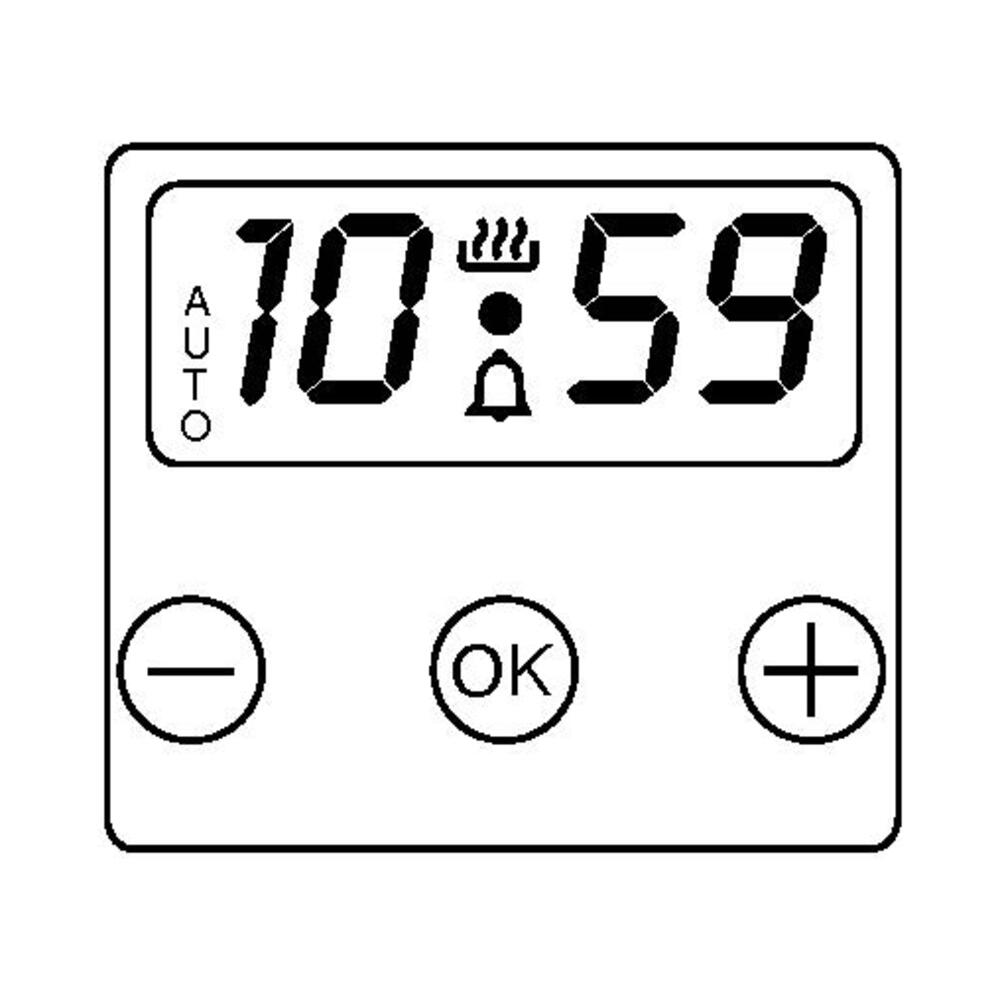
| Timer not in manual mode | Set the timer to manual mode (hand symbol) and ensure AUTO is not active. |
| Internal airflow obstruction | Remove trays, foil, or rotisserie drip pan that may be restricting airflow. |
| Oven door opened during preheat | Keep the oven door closed until preheat is complete. |
| Large oven cavity (normal behavior) | Allow additional preheat time; professional ovens may take longer than standard units. |
| Incomplete power supply (no 240V) | Check and reset circuit breaker; confirm unit is receiving full 220–240V supply. |
| Heating element partially functioning (electric models) | Escalate to service to test and replace weak or failing bake/broil element. |
| Igniter weak or delayed (gas models) | Escalate to service to inspect and replace igniter if ignition is slow or inconsistent. |
| Thermostat or temperature control variance | Escalate to service to test and recalibrate or replace thermostat if inaccurate. |
Step 1: Confirm a cooking function is selected
Different cooking modes affect preheat speed. Convection modes provide faster and more efficient preheating.
Steps:
- Select Convection Bake / Fan Cooking
- Set temperature to 350°F (175°C)
- Allow the oven to run for 5–10 minutes
Note: Convection modes preheat faster than static/bake modes. Refer to the ILVE Oven Functions Guide for Nostalgie. If preheat remains slow, proceed to the next step.
Step 2: Check timer is set to manual
Nostalgie ovens rely on a manual timer system. If the timer is not set correctly, heating may be limited or inconsistent. Steps:- Simultaneously press the buttons [–] / [+] together for 3 seconds to reset any cooking programs
Step 3: Check for internal obstructions
Items left inside the oven can restrict airflow and slow heating.
Steps:
- Remove any baking trays or pans not in use
- Remove foil blocking vents
- Remove the rotisserie drip pan unless in use (common issue)
Test the oven again.
Step 4: Avoid opening the oven door
Opening the oven door during preheat can significantly delay heating.
Steps:
- Keep the oven door closed during preheat
- Allow the oven to reach the set temperature before opening
Even brief door openings can disrupt heat buildup and extend preheat time.
Step 5: Reset the oven power
A reset can clear minor control or sensor inconsistencies.
Steps:
- Turn OFF the circuit breaker
- Wait at least 2 minutes
- Turn the breaker back ON
Then test the oven:
- Cooking mode: Convection / Fan
- Temperature: 350°F (175°C)
If preheat remains slow, proceed to the next step.
Step 6: Confirm electrical supply
ILVE ranges require a 220–240 volt supply for proper heating performance.
If the oven is receiving partial power:
- Heating may be reduced or inconsistent
- Heating may stop unexpectedly
- Display or controls may reset or shut off
Verify:
- Breaker if fully ON
- No partial trip has occurred
- Unit is connected to 220-240V supply
⚠
Electrical Requirements & Tips
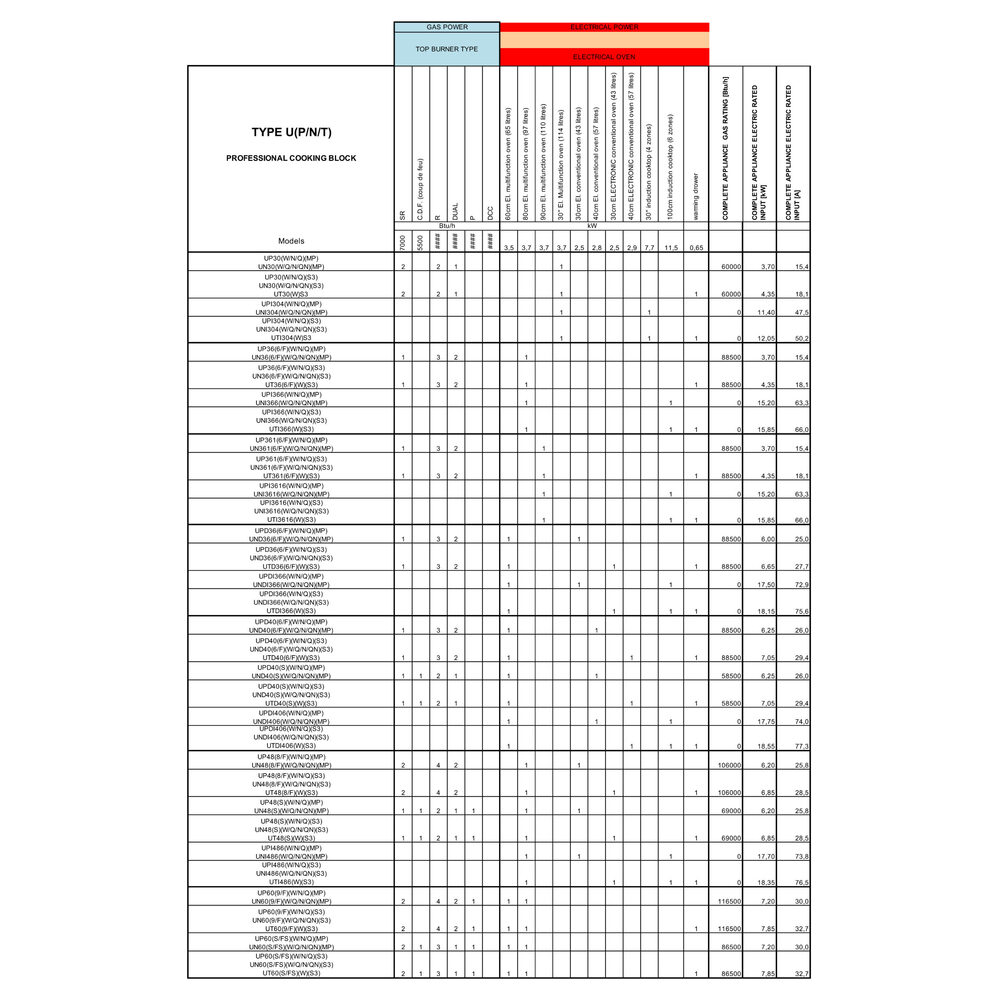
- Circuit amperage varies by model and size — refer to the series-specific power tables at the end of this guide.
- If the range receives 120V instead of 240V, the display and lights may function, but the oven will not heat properly.
- If electrical supply is uncertain, consult a qualified electrician.
Step 7: Identify oven behavior
| Situation | Issue | Possible Causes |
|---|---|---|
| A | Oven heats slowly |
|
| B | Uneven heating or difficulty reaching temperature |
|
| C | Broiler works but bake heats slowly |
|
| D | Excessive preheat time (20+ minutes) |
|
Step 8: Cooling fan & airflow check
Internal airflow is critical for proper heat distribution. If airflow is reduced, preheat time may increase.
Steps:
- Listen for cooling fan operation
- Confirm airflow is present during oven operation
If the fan is not running properly, service may be required.
Step 9: Gas vs electric considerations
| Gas Oven Cavities | Electric / Dual-Fuel Oven Cavities |
|---|---|
If flame is weak or inconsistent:
|
If one element is not functioning:
|
When to contact service
If the oven does not heat after completing these steps, the problem may involve:
- Heating element degradation
- Igniter weakness (gas models)
- Temperature sensor or thermostat issue
- Cooling fan malfunction
- Electronic control board issue
These components require inspection by a qualified service technician.
Contact ILVE USA Customer Service to schedule service.
