
Overview
ILVE Majestic ovens are designed as high-performance, professional-grade appliances, using advanced electronic controls and multi-element heating systems to deliver precise and consistent cooking results.
If the oven powers on and the display and controls function normally, but the oven cavity does not begin heating, the issue is typically related to operational settings, programming conditions, or power supply, rather than an immediate component failure.
In many cases, heating is prevented by factors such as an inactive cooking mode, programmed settings, or partial electrical supply — all of which can be resolved through basic troubleshooting.
This guide outlines the most common causes and provides step-by-step instructions to restore normal operation or determine if service is required.
Common Causes
If the oven display and controls operate normally but the oven does not heat, the issue is typically related to one of the following:
- A cooking function has not been selected
- Demo Mode may be enabled
- The clock has not been set
- A timer or delayed cooking program is active
- The appliance requires a power reset
- The appliance is receiving partial electrical power
- The safety thermostat has been triggered
- A heating element or igniter has failed
Operational Note
Majestic ovens use electronic controls and require an active cooking function to initiate heating. If a cooking mode is not selected or a programmed setting is active, the oven may appear to operate normally without producing heat.
In many cases, a no-heat condition is related to settings or power conditions rather than a component failure.
Troubleshooting Tip
Review the troubleshooting chart on the following page before contacting service.| Possible Cause | What To Do |
|---|---|
| Cooking function not selected | Turn the function knob to a valid cooking mode (e.g., Bake or Convection); ensure it is not set to “OFF”. |
| Demo Mode (Showroom Mode) is active | Disable Demo Mode in the settings. Refer to the Demo Mode video for step-by-step guidance. |
| Clock not set or cooking program active | Check for AUTO mode, timers, or delayed start programs. Cancel all programs and return to manual mode. Ensure the clock is set. |
| Control interruption or software issue | Perform a power reset. Turn OFF the circuit breaker for 2 minutes, then turn it back ON and test the oven again. |
| Partial or incorrect electrical supply | Confirm the appliance is receiving 220–240V power. Check the circuit breaker is fully ON and not partially tripped. |
| Oven powers on but does not heat | Recheck Steps 1–5. If the issue persists, internal components may require service. |
| Broiler works but bake does not | The lower bake element may have failed and may require replacement. |
| No oven operation | Check the power supply and circuit breaker. If there is no response, service may be required. |
| Safety thermostat has been triggered | Allow the oven to cool completely and ensure proper ventilation. If the issue continues, service is required. |
| Gas or electric component issue | Gas ovens: check ignition and gas supply. Electric ovens: check heating elements. Contact service if unresolved. |
Step 1: Confirm a cooking function is selected
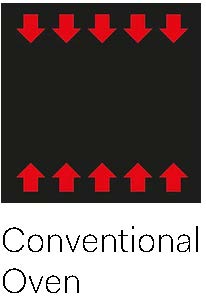
Majestic ovens require an active cooking function to initiate heating. Setting a temperature alone will not start the oven. Steps:- Select a cooking function (Bake / Static, Fan Forced, or Convection Bake)
- Set temperature to 350°F (175°C)
- Allow the oven to run for 3–5 minutes

Step 2: Check for Demo Mode
Majestic ovens include Demo Mode (Showroom Mode), which disables heating elements while allowing the display and controls to function normally.
If the oven runs but does not heat, Demo Mode may be enabled.
Disable Demo Mode if active. Refer to the Demo Mode video for instructions.
Step 3: Check clock and cooking programs
If a delayed or programmed cooking function is active, the oven may not begin heating immediately.
This may include:
- AUTO or timed cooking mode
- Delayed start
- Active cooking timer
- Automatic cooking program
Cancel any active programs and return the oven to manual cooking mode. Also confirm the clock is set, as the oven may not operate until the time is configured.
Refer to the Majestic II Touchscreen Tutorial video for instructions.
Step 4: Reset the oven power
A power reset can clear temporary electronic interruptions.
Steps:
- Turn OFF the circuit breaker supplying power to the range
- Wait at least 2 minutes
- Turn the breaker back ON
Once the control panel restarts, test the oven:
- Cooking mode: Bake / Static
- Temperature: 350°F (175°C)
Step 5: Confirm electrical supply
ILVE ranges require a 220–240 volt supply for proper heating performance. If the oven is receiving partial power:- Heating may be reduced or inconsistent
- Heating may stop unexpectedly
- Display or controls may reset or shut off
- Breaker if fully ON
- No partial trip has occurred
- Unit is connected to 220-240V supply
Electrical Requirements & Tips
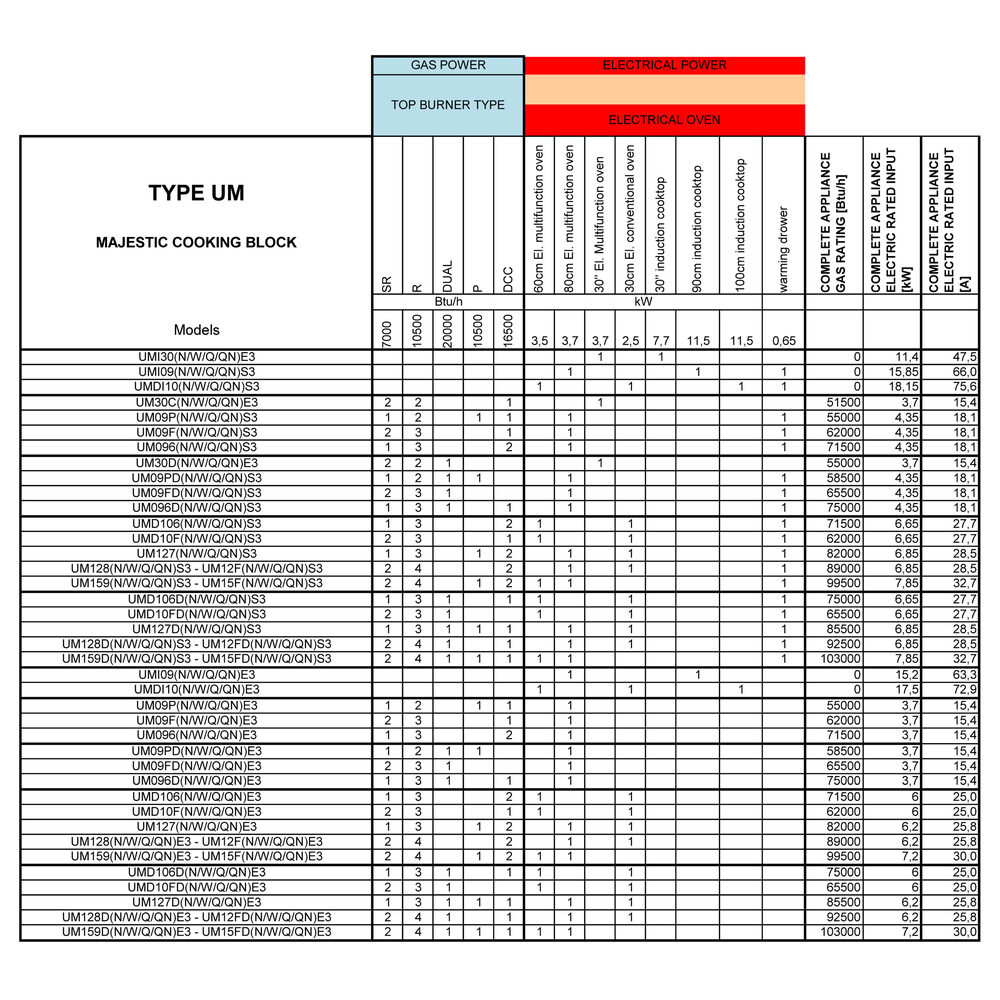
- Circuit amperage varies by model and size — refer to the series-specific power tables at the end of this guide.
- If the range receives 120V instead of 240V, the display and lights may function, but the oven will not heat properly.
- If electrical supply is uncertain, consult a qualified electrician.
Step 6: Identify oven behavior
| Situation | Issue | Possible Causes |
|---|---|---|
| A | Display is on but oven does not heat |
|
| B | Oven clicks but does not heat (gas models) |
|
| C | Broiler works but oven does not heat in bake mode |
|
| D | Oven does not power on |
|
Step 7: Safety thermostat protection
ILVE ovens include a safety thermostat that disables heating if overheating is detected.
This may occur if:
- Ventilation around the appliance is restricted
- Cooling fan is not operating properly
- Electrical power is unstable
- Oven is operated at high temperatures for extended periods
Typical symptoms include:
- Display operates normally
- Oven does not heat
Reset or inspection of the safety thermostat typically requires a qualified technician.
Step 8: Gas vs electric considerations
| Gas Oven Cavities | Electric / Dual-Fuel Oven Cavities |
|---|---|
|
The burner should ignite shortly after the oven is turned on.
If the burner does not ignite, possible causes include:
|
Electric ovens use internal heating elements to produce heat.
Procedure:
|
When to contact service
If the oven does not heat after completing these steps, the problem may involve:
- Igniter
- Heating element
- Safety thermostat
- Cooling fan
- Door microswitch
- Electronic control board
These components require inspection by a qualified service technician.
Contact ILVE USA Customer Service to schedule service.
