
Overview
ILVE Majestic ovens feature advanced electronic controls, multi-element heating systems, and integrated safety protections designed to ensure consistent cooking performance.
If the oven turns off during operation, it is typically a protective response caused by overheating, restricted airflow, electrical instability, or a component-related interruption—not a complete system failure.
Proper ventilation and stable electrical supply are essential, as airflow restriction or installation conditions can directly impact performance and trigger a shutdown.
This guide outlines the most common causes and provides step-by-step instructions to identify whether the issue is operational, electrical, or service-related.
Common Causes
If the oven turns off during operation, the issue is typically related to one of the following:
- Overheating due to blocked airflow
- Safety thermostat activation
- Incorrect timer or automatic cooking setting
- Unstable or incomplete electrical supply
- Cooling fan not operating properly
- Faulty temperature sensor
- Failing control board
- Ignition interruption or flame failure on gas models
Operational Note
Majestic ovens use electronic controls and integrated safety systems to regulate operation.
If abnormal conditions are detected—such as overheating, airflow restriction, or electrical instability—the oven may shut down as a protective measure.
A one-time shutdown may be incidental. Repeated shutdown is not normal and should be addressed.
Troubleshooting Tip
Review the troubleshooting chart on the following page before contacting service.| Possible Cause | What To Do |
|---|---|
| Incorrect cooking mode selected | Select Convection / Fan Cooking mode for faster preheat instead of static/bake mode. |
| Temperature set too low | Set temperature to desired level (e.g., 350°F+) and allow sufficient time to reach it. |
| Internal airflow obstruction | Remove trays, foil, or rotisserie drip pan that may be restricting airflow. |
| Oven door opened during preheat | Keep the oven door closed until preheat is complete. |
| Large oven cavity (normal behavior) | Allow additional preheat time; professional ovens may take longer than standard units. |
| Incomplete power supply (no 240V) | Check and reset circuit breaker; confirm unit is receiving full 220–240V supply. |
| Heating element partially functioning (electric models) | Escalate to service to test and replace weak or failing bake/broil element. |
Step 1: Check for overheating & airflow restriction
Majestic ovens rely on proper airflow to regulate internal temperature. Restricted airflow can cause overheating and trigger a shutdown.
Steps:
- Remove any foil, trays, or cookware blocking vents
- Reposition racks to allow proper airflow
- Avoid overloading the oven cavity
Retest the oven.
Step 2: Confirm cooling fan operation
Cooling fans regulate internal temperatures and prevent overheating. If the fan is not operating properly, the oven may shut down mid-cycle.
Steps:
- Start the oven and listen for cooling fan operation
- Confirm consistent airflow during operation
If the fan is not running, operates irregularly, or produces abnormal noise, service is required.
Step 3: Evaluate cooking conditions
High temperatures, heavy loads, or frequent door openings can disrupt heat balance and cause shutdown.
Steps:
- Test under standard conditions (350°F / 175°C, Convection mode)
- Avoid opening the oven door repeatedly
- Reduce oven load to allow proper airflow
Step 5: Reset the oven power
A reset can clear minor control or sensor inconsistencies.
Steps:
- Turn OFF the circuit breaker
- Wait at least 2 minutes
- Turn the breaker back ON
Then test the oven:
- Cooking mode: Convection / Fan
- Temperature: 350°F (175°C)
Step 6: Confirm electrical supply
ILVE ranges require a 220–240 volt supply for proper heating performance. If the oven is receiving partial power:- Heating may be reduced or inconsistent
- Heating may stop unexpectedly
- Display or controls may reset or shut off
- Breaker if fully ON
- No partial trip has occurred
- Unit is connected to 220-240V supply
Electrical Requirements & Tips
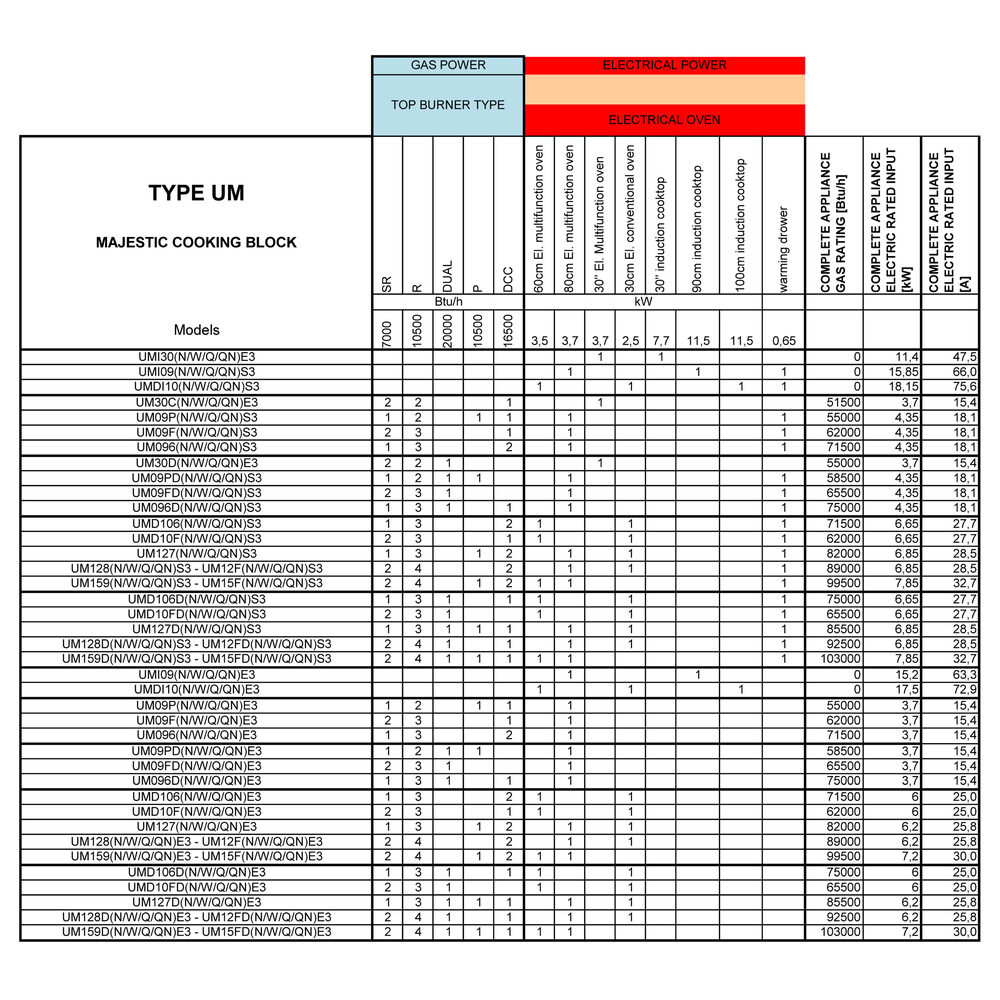
- Circuit amperage varies by model and size — refer to the series-specific power tables at the end of this guide.
- If the range receives 120V instead of 240V, the display and lights may function, but the oven will not heat properly.
- If electrical supply is uncertain, consult a qualified electrician.
Step 6: Identify oven behavior
| Situation | Issue | Possible Causes |
|---|---|---|
| A | Oven shuts off completely | Likely electrical supply issue |
| B | Oven remains on, but stops heating | Likely overheating or safety cutoff |
| C | Shuts off when oven is full or heavily loaded | Likely airflow restriction inside cavity |
| D | Shuts off at higher temperatures only | Likely cooling or ventilation issue |
| E | Gas flame drops during cooking (gas models only) | Likely igniter or gas supply issue |
Step 7: Gas vs electric considerations
| Gas Oven Cavities | Electric / Dual-Fuel Oven Cavities |
|---|---|
|
Flame should ignite and remain stable (cycling is normal). If the flame:
→ Possible igniter or gas supply issue |
Elements cycle to maintain temperature; the oven should not shut down. If shutdown occurs:
|
Step 8: Allow full cooldown and retest
If the oven shut down due to heat buildup, allow it to cool completely before restarting.
Steps:
- Allow the oven to fully cool
- Restart under standard conditions
- Test again
If the issue repeats, it may indicate an airflow, cooling, or component-related issue.
When to contact service
If the oven does not heat after completing these steps, the problem may involve:
- Cooling fan malfunction
- Airflow system imbalance
- Temperature sensor failure
- Control board issue
- Electrical supply instability
- Igniter or gas valve issue
These components require inspection by a qualified service technician.
Contact ILVE USA Customer Service to schedule service.
